I've been using TanStack Start for a few self-hosted projects lately and got curious how it actually holds up under load. Specifically things like whether it leaks memory over time and how SSR throughput scales as concurrency increases. I also wanted to see what wiring up Prometheus metrics looks like in a TanStack Start app, partly because I haven't seen it documented anywhere and partly because I wanted real observability data during the test rather than just a k6 summary at the end.
The tedious part of this kind of thing is usually building a realistic app to test against. A "hello world" page tells you almost nothing, you need routes that do real work. I ended up using Claude Code to generate the whole mock app, which cut what would've been a few days of busywork down to an hour or two.
Tested with TanStack Start 1.163.2, prom-client 15.1.3, and Bun 1.3.10.
The test target
An SSR framework's interesting behaviour shows up when routes do actual work, aggregating data, rendering non-trivial component trees, taking different code paths per request. I wanted something that would produce naturally varied, uneven traffic rather than a uniform for loop.
I used Claude Code for the whole process:
- Ideation, where I described what I was trying to do and asked Claude to suggest realistic app ideas. From the shortlist it gave me, I picked a fake stock trading platform called FSTR Exchange.
- Planning, where I had Claude draft an implementation plan and then reviewed it manually. I was mostly checking that it was using TanStack Start's APIs correctly, since the model occasionally reaches for patterns from older versions of the router.
- Implementation, where I handed the plan to Claude Code, which implemented the whole thing in one shot.
One thing I've found is that using shadcn as the component library makes a meaningful difference to the output quality. The agent can compose shadcn primitives into something that looks reasonable without needing detailed UI instructions, which keeps the prompt focused on behaviour rather than appearance.
The resulting app has two routes:
/, a market overview dashboard that aggregates data across all stocks, computes derived fields (trend, change percent, market cap), and renders a full table with sparkline charts./$ticker, a stock detail page with a price history chart, order book, and trade form. Heavier per-request than the overview because it renders Recharts with 100 data points.
The stock trading theme also produces naturally uneven traffic. Some tickers are "hot" (DOGE, HYPE - Claude Code got creative with the naming), others barely get touched (FLAT). The k6 load script mirrors this with a weighted ticker distribution and three distinct scenarios running concurrently:
market_watchers, 20 VUs continuously hitting/with short think times, modelling users watching prices update.ticker_browsers, 8 VUs loading/then clicking through to a weighted-random ticker detail page with longer dwell time.hotspot_hype, a ramping-arrival-rate spike to 30 req/s on/HYPE, firing mid-test to simulate a thundering herd on a single resource.
The soak test runs the same mixed traffic at 15 VUs for 20 minutes, with metrics captured in the first and last minute to detect any performance drift over time.
The observability stack
The full stack runs in Docker Compose: the TanStack Start app, Prometheus, Grafana, and k6 as a service.
The useful thing here is that both the app's own metrics and k6's test metrics
end up in the same Prometheus instance. The app exposes /metrics (scraped
every second by Prometheus) and k6 pushes its results via remote write using
the experimental-prometheus-rw output. This means you can overlay request
throughput from k6 against the app's response time histograms and Node.js
heap usage in a single Grafana dashboard, which is far more informative than
reading them separately.
k6:
  image: grafana/k6:latest
  environment:
    - K6_PROMETHEUS_RW_SERVER_URL=http://prometheus:9090/api/v1/write
  command: run --out experimental-prometheus-rw --out web-dashboard /scripts/${K6_SCRIPT:-load.js}
  depends_on:
    app:
      condition: service_healthy
    prometheus:
      condition: service_healthy
The depends_on: condition: service_healthy bit is important. Without health
check conditions, k6 starts immediately and hammers the app before it's
finished booting, producing a wave of errors at the start that pollutes the
results. The app exposes a /health endpoint (see below) and Prometheus has a
/-/ready endpoint, so Compose can wait for both before starting k6.
Exposing server-only HTTP endpoints in TanStack Start
TanStack Start's file-based routing is designed for SSR pages that return
HTML, so it's not immediately obvious how to add endpoints that return plain
text or JSON. The answer is the server.handlers property on the route
definition.
// src/routes/health.tsx
import { createFileRoute } from "@tanstack/react-router";

export const Route = createFileRoute("/health")({
  server: {
    handlers: {
      GET: async () => {
        return new Response(JSON.stringify({ status: "ok" }), {
          headers: { "Content-Type": "application/json" },
        });
      },
    },
  },
});
server.handlers bypasses the React rendering pipeline entirely for these
routes, and any HTTP method can be handled. The /metrics endpoint uses the
same pattern, returning prom-client's text format directly:
// src/routes/metrics.tsx
import { createFileRoute } from "@tanstack/react-router";
import client from "prom-client";

export const Route = createFileRoute("/metrics")({
  server: {
    handlers: {
      GET: async () => {
        const metrics = await client.register.metrics();
        return new Response(metrics, {
          headers: { "Content-Type": client.register.contentType },
        });
      },
    },
  },
});
I found this fairly straightforward thanks to how TanStack Start supports API routes.
Instrumenting TanStack Start with prom-client
Prometheus instrumentation lives in two places: a central metrics module and a server middleware.
The metrics module initialises the default Node.js metrics (heap usage, event loop lag, GC stats) and exports the custom HTTP metrics:
// src/lib/metrics.ts
import client from "prom-client";

client.collectDefaultMetrics();

export const httpRequestDuration = new client.Histogram({
  name: "http_request_duration_seconds",
  help: "Duration of HTTP requests in seconds",
  labelNames: ["method", "route", "status_code"],
  buckets: [0.01, 0.05, 0.1, 0.3, 0.5, 1, 2, 5],
});

export const httpRequestTotal = new client.Counter({
  name: "http_requests_total",
  help: "Total number of HTTP requests",
  labelNames: ["method", "route", "status_code"],
});
The middleware wraps each request, starts the histogram timer before calling
next(), and records the result after:
// src/middleware/observability.ts
import { createMiddleware } from "@tanstack/react-start";
import { httpRequestDuration, httpRequestTotal } from "@/lib/metrics";

export const observability = createMiddleware().server(async ({ request, next }) => {
  const url = new URL(request.url);
  const route = url.pathname;
  const end = httpRequestDuration.startTimer({
    method: request.method,
    route,
  });
  try {
    const result = await next();
    end({ status_code: result.response.status });
    httpRequestTotal.inc({
      method: request.method,
      route,
      status_code: result.response.status,
    });
    return result;
  } catch (error) {
    end({ status_code: 500 });
    httpRequestTotal.inc({
      method: request.method,
      route,
      status_code: 500,
    });
    throw error;
  }
});
The .server(...) on createMiddleware() ensures the instrumentation only
runs on the server. Without it, TanStack Start would attempt to run the
middleware on the client too, where prom-client isn't available.
One non-obvious thing: the import style in metrics.ts matters. Using named
imports from prom-client causes metrics to silently not appear at the
/metrics endpoint. I've written more about this in
the gotcha below.
Results
TanStack Start handled the load well. Running three concurrent scenarios (20 VUs on the market overview, 8 VUs browsing to ticker detail pages, and a 30 req/s hotspot spike on a single ticker), all six thresholds passed with room to spare. 2,844 requests at ~26 req/s, zero HTTP errors, 100% success rate.
Latency by route:
| Route | p50 | p90 | p95 | max |
|---|---|---|---|---|
/ (market overview) | 9.7ms | 15.6ms | 17.8ms | 131.8ms |
/$ticker (stock detail) | 7.1ms | 10.9ms | 12.6ms | 35.0ms |
Here's what the Grafana app metrics dashboard looked like during the test:
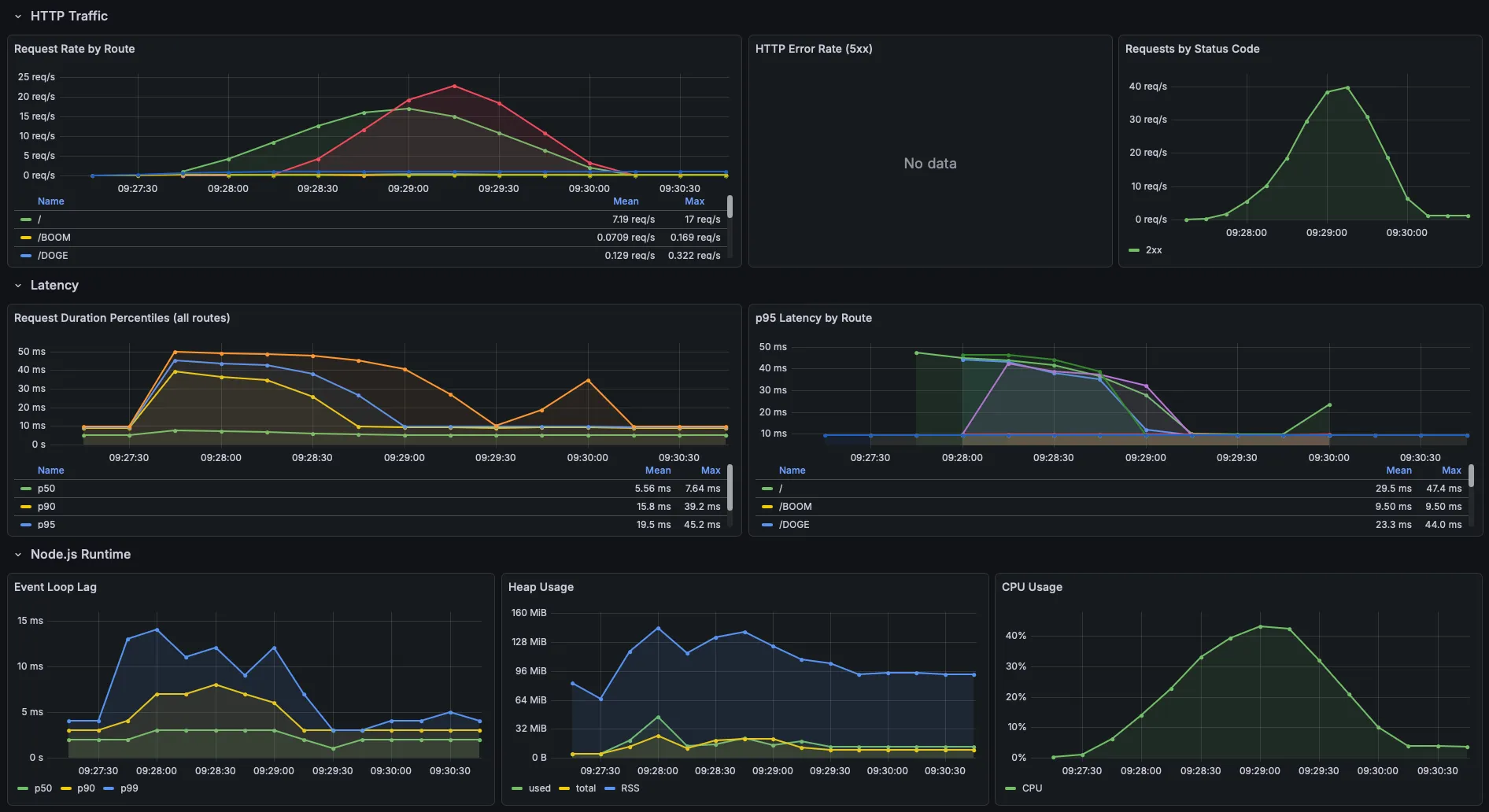
The ticker detail page came in faster than the overview despite having more server-rendered
data on the page (e.g. close to 100 data points), which I didn't expect. I think it's
because the overview sees higher concurrency, the market_watchers scenario
(20 VUs) and the index leg of ticker_browsers (8 VUs) both hit /
simultaneously, while detail pages are only hit by the browser scenario plus
the hotspot spike.
CPU peaked at ~42% during the sustained load phase and tracked the ramp-up and ramp-down cleanly. RSS peaked at ~140 MiB at full load and settled back to ~90-95 MiB as VUs drained. The V8 heap itself stayed flat at 10-20 MiB throughout, with no sign of accumulation. For a self-hosted app that isn't going to see this level of sustained traffic, I think the numbers are great.
Gotchas
I ran into a few things that weren't obvious going in.
prom-client named imports resolve against a different registry
This one took a while to debug. If you import collectDefaultMetrics or
Histogram as named exports, they work, but when client.register.metrics()
is called at the /metrics endpoint, those metrics don't appear. The named
exports bind to a different internal registry instance than the default
client.
The fix is to import the default export and call everything through it:
// ✅ Correct
import client from "prom-client";
client.collectDefaultMetrics();
export const httpRequestDuration = new client.Histogram({ ... });

// ❌ Silent failure - metrics won't appear at /metrics
import { collectDefaultMetrics, Histogram } from "prom-client";
k6 starts before the app is ready without health check conditions
depends_on in Docker Compose by default only waits for the container to
start, not for the service inside it to be ready. k6 would fire requests
immediately on container start and log a wave of connection errors before the
app finished its build step. The fix is condition: service_healthy on each
dependency, which requires a healthcheck block on each service. For the app,
a simple GET to /health is enough.
k6 metrics and app metrics need the same Prometheus instance
Running k6 locally (outside Docker) and the app in Docker means they'd write
to different Prometheus instances, making it impossible to correlate load test
throughput against app response times in a single Grafana dashboard. Running
k6 as a Docker Compose service and pointing K6_PROMETHEUS_RW_SERVER_URL at
the same Prometheus container keeps everything in one place.
Takeaways
If there's one thing I got out of this, it's that having app metrics and load test metrics in the same Prometheus instance is a game changer for understanding what's actually happening. The k6 summary alone would've told me the thresholds passed, but overlaying it against heap usage and response time histograms in Grafana gave me confidence that there's nothing lurking underneath the good numbers.
TanStack Start itself held up well. Sub-20ms p95s across both routes under
sustained load, no memory leaks over the soak test, and the
server.handlers API made it straightforward to bolt on health and metrics
endpoints without fighting the framework. For self-hosted side projects, I
think that's more than enough.